What worked well
Customers were not kept waiting during the morning rush.
Supported positive.
Anonymous physical-space intelligence
Occupancy, dwell, and evidence-backed findings from the cameras you already have.
Harbor Coffee · demo
Saturday morning occupancy
Supported test
Tables stayed full while people stood nearby waiting for a seat.
Suggested test:
Add seating in the seating area.
Evidence:
Peak 22 people visible · Seating peak 12 · Standing nearby
Sample window
How Occuvis works
01 · See
Views become anonymous occupancy, dwell, and movement.
02 · Understand
Zone use, repeated behavior, and how areas relate.
03 · Decide what matters
What Worked Well · Observation · Opportunity · Recommendation.
04 · Act
Suggested tests appear only when evidence supports one.
05 · Verify
Supporting Moments when a visual window was captured.
Set up Occuvis for your space
You do not have to teach it every behavior it might notice.
1 · Choose your venue type
The measurements stay the same. Goals and language follow this venue.
2 · What do you want Occuvis to help improve?
Goals change which supported findings are emphasized — not the underlying measurements.
If this is the priority
Order-line occupancy and clustering near pickup
Same space. Different priorities.
Operator A
Improve service flow
Report emphasizes: Uneven use of equivalent pickup positions
Operator B
Understand seating use
Report emphasizes: Seating held sustained dwell after pickup
Goals influence prioritization, not whether a finding is true.
3 · Walk Occuvis through the space
You name the obvious places. Occuvis can still notice repeated behavior outside them.
Named as context
Entrance
Lightweight semantic setup — not a polygon for every future behavior.
4 · Occuvis handles the rest
01
Configured areas
Context
02
Scene behavior
Measured
03
Patterns
Evaluated
04
Report
Supported findings
What Occuvis measures
Those are inputs. The report is the product.
Occupancy
People visible over time
Dwell
Where people stay
Movement
How demand travels
Zone performance
Named-area activity
Repeated behavior
Stops, clustering, imbalance
Operational patterns
What held up, what to test
Named areas + scene intelligence
Occuvis can still notice repeated behavior outside them.
Configured
Entrance
Seating
Pickup
Entrances, service, seating, displays.
Also noticed
Unlabeled pause
Repeated stops, clustering, uneven use.
From metrics to meaning
What worked well
Customers were not kept waiting during the morning rush.
Supported positive.
Observation
Two equivalent pickup positions were used unevenly while occupancy stayed elevated.
True — not automatically a recommendation.
Opportunity
People repeatedly paused beside the pastry case, outside any named zone.
Worth investigating.
Recommendation
Add seating. Tables stayed full while people stood waiting nearby.
Only with sufficient evidence.
Supporting Moments
When a relevant visual window was captured — not for every metric.
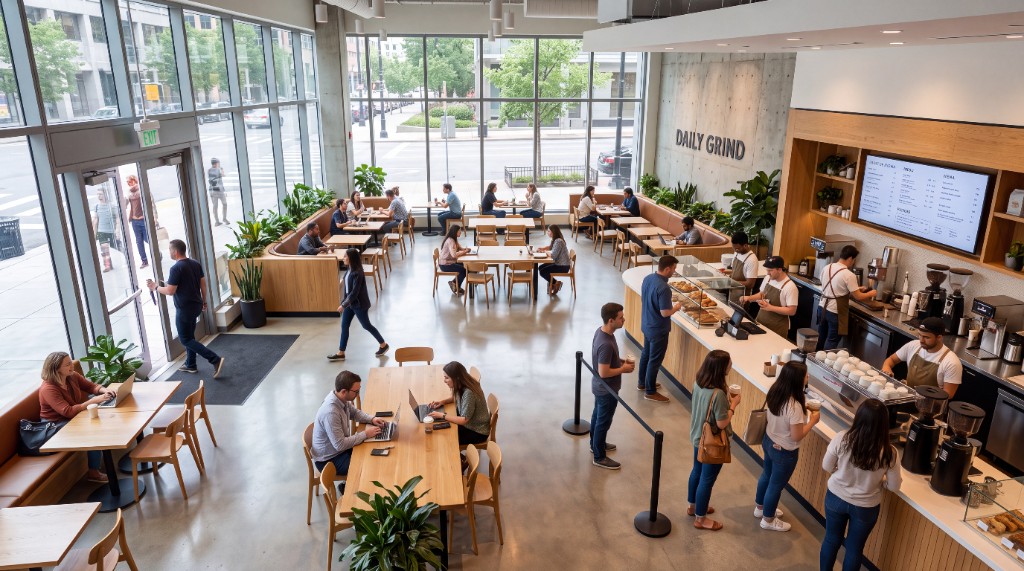
Rush hour at the counter. The line stayed short.
Seating stayed full. People stood nearby waiting for a table.
Demo photo — fictional venue, not customer footage.
Adapts to your venue
Example · Observation
Two equivalent pickup positions were used unevenly while occupancy stayed elevated.
Shared across venues: Occupancy · Dwell · Movement · Zone activity · Repeated behaviors · Patterns outside named areas. Café language is one interpretation of the shared measurements — not a claim that every café layout is field-validated.
The report is the product
Occuvis shows the strength of the underlying evidence so operators know how much weight to give a finding.
Sample report
Harbor Coffee — Demo Location
Saturday, September 12, 2026
Zone performance
Avg occupancy
10.7
Peak · 22 at 9:40 AM
What worked well
Customers were not kept waiting during the morning rush.
Recommended test
Add seating. Tables stayed full while people stood waiting nearby.
Scheduled analysis
Choose when Occuvis should analyze your space. After each window, the report is available in the app and can be delivered to the people you choose.
01
Operating hours
You choose the window
02
Occuvis analyzes
Anonymous measurements
03
Report generated
Findings, when supported
04
In the app
Same report, always
05
Optionally emailed
To people you choose
Recurring analysis
Monday
Report
Wednesday
Report
Saturday
Report
Scheduled analyses create an ongoing record you can revisit and compare.
Movement and space usage — not who someone is.
Open the fictional Harbor Coffee sample, or talk with us about a pilot on your cameras.